From Dead Stock to Full Margin: How One Pet Store Fixed Inventory with Mica

From Dead Stock to Full Margin: How One Pet Store Fixed Inventory with Mica
If you run a pet store, you know the feeling. You walk into the back room and see 40 bags of a grain-free cat food that has not moved in three months. Meanwhile, the popular flea treatment has been out of stock for two weeks, and customers are walking out. Inventory in a pet store is uniquely challenging because you are managing food with expiration dates, accessories that cycle in and out of style, medications with strict handling rules, and specialty products that only move during certain seasons. The margin for error is razor-thin, and every mistake goes straight to your bottom line.
The Hidden Cost of Poor Inventory
Pet stores operate on margins between 35 and 55 percent depending on the category. Food margins are tight at 25 to 35 percent. Accessories and toys can hit 55 percent or higher. But those margins evaporate the moment a bag of food expires, a seasonal toy goes unsold, or a top-selling flea treatment sits on a backorder list. According to industry data, small pet retailers lose between 3 and 8 percent of annual revenue to expired goods, stockouts, and overstock write-offs. For a store doing $500,000 a year, that is $15,000 to $40,000 vanishing into thin air.
I spoke with Sarah Chen, who runs Austin Pet Supply, an independent pet store in Austin, Texas. She carries roughly 2,400 SKUs across dry food, wet food, treats, supplements, toys, grooming supplies, and medications. Before she found Mica, Sarah was spending about 18 hours a week on inventory-related tasks. That is nearly half a standard workweek spent on counting, cross-referencing, and guessing. She had tried three different inventory apps over two years. One was too rigid for her product mix. Another required a $349 monthly subscription. The third had a steep learning curve that frustrated her part-time staff. None of them solved the core problem: she needed a system that adapted to her store, not the other way around.
The Problem — Disconnected Spreadsheets and Expired Product
Before Mica, Sarah's inventory system was held together by spreadsheets that did not talk to each other. She had one workbook for purchases, a second for sales tracking, a third for supplier contacts, and a stack of handwritten sticky notes for products approaching their expiration dates. Every week, someone had to manually cross-reference data from three separate sources just to figure out what needed to be reordered. Mistakes were not the exception — they were the norm.
Why Pet Stores Have It Harder Than Other Retailers
Pet stores carry an unusually diverse product mix compared to other small retailers. A boutique clothing store moves mostly one type of item. A gift shop deals in general merchandise. But a pet store has to manage:
- Dry and canned food with expiration dates ranging from 6 to 18 months out. A mis-shelved product can sit in the back until it expires.
- Supplements and medications that require lot tracking and temperature awareness. Certain joint supplements and flea preventatives lose potency if stored improperly.
- Toys and accessories driven by seasonal trends. Halloween costumes sell in September and October. Cooling mats move in July. If you miss the window, you are stuck with inventory until next year.
- Consumables like litter, bedding, and waste bags that move consistently but take up storage space.
- Live animals in some stores, which require separate tracking for feeding schedules and habitat supplies.
Sarah estimated she was losing roughly $1,200 a month in expired products alone. That is $14,400 a year going directly into the trash. The worst part was that most of the waste was preventable. A pallet of senior dog food had expired because nobody noticed the date printed on the case. A shipment of dental chews sat in a warm back room for three months past their best-by date. These were not bad products. They were products that got forgotten because the tracking system did not exist.
The Search for a Solution
Sarah evaluated three paid inventory platforms before trying Mica. The first was a cloud-based system designed for multi-location retailers. It cost $299 a month and required a six-month commitment. The second was a spreadsheet add-on that automated some formulas but could not handle expiration tracking. The third was a bar-code-based system that required $800 worth of hardware upfront. All of them required training, onboarding, and ongoing fees. For a store running on thin margins, none of these options made financial sense.
The Turning Point — One Prompt, One Solution
Sarah opened Mica on a Tuesday afternoon when the store was quiet. She typed a single sentence:
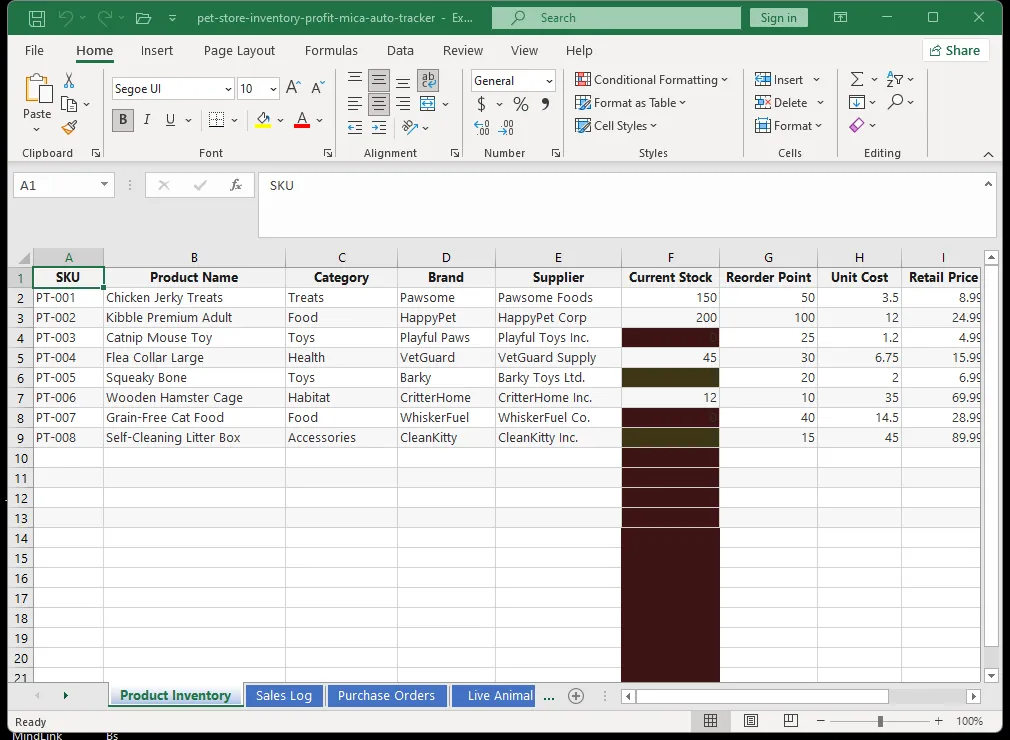
"Build me a complete inventory tracker for my pet store. Include columns for product name, category, current stock, reorder point, supplier, cost price, selling price, and expiration date. Add conditional formatting to highlight items below their reorder point in red and items expiring within 30 days in yellow. Create a second sheet that shows monthly sales by category with a bar chart. Add a third sheet for supplier contact info and order history."
Mica processed the request in approximately 30 seconds. The workbook appeared with three fully functional sheets, populated with sample data that demonstrated how everything worked. Sarah did not need to watch a tutorial, read a manual, or configure anything. The system worked immediately.
What the System Included
Sheet One — Inventory Master: Every single SKU in the store with its current stock level, reorder threshold, unit cost, retail price, supplier name, lead time, and expiration date. The conditional formatting did exactly what Sarah asked: stock below reorder point turned red, products expiring within 30 days turned yellow, and healthy inventory stayed green.
Sheet Two — Category Summary: Auto-calculated totals for each department. Dry food, wet food, treats, toys, grooming, supplements, and medications each had their own row showing total stock value, monthly sales, and margin percentage. A bar chart updated automatically as data changed.
Sheet Three — Supplier Management: Every supplier with contact information, typical lead times, order history, and a notes field for Sarah to track which vendors offered seasonal discounts or had reliability issues.
Sheet Four — Expiration Calendar: Sarah added this later with a follow-up prompt. It consolidated all expiring products into a single view sorted by expiration date. She now checks it every Monday morning.
The Results — 15 Hours Back and a Healthier Bottom Line
Sarah ran the numbers after the first full month using Mica's tracker. The improvements were dramatic.
Time Savings
| Task | Before Mica | After Mica | Time Saved |
|---|---|---|---|
| Manual stock counts | 6 hours/week | 1 hour/week | 5 hours |
| Data entry across spreadsheets | 4 hours/week | 30 min/week | 3.5 hours |
| Supplier communications and ordering | 3 hours/week | 1 hour/week | 2 hours |
| Expired stock inspection | 3 hours/week | 15 min/week | 2.75 hours |
| Monthly reconciliation | 2 hours/month | 20 min/month | 1.67 hours |
Total weekly time on inventory: 18 hours per week dropped to 3 hours per week. That is 15 hours saved every single week.
Financial Impact
The dollar savings were equally compelling:
- Expired product write-offs: Dropped from $1,200 per month to under $100. The expiration calendar caught products before they turned, and Sarah started running monthly "clearance" promotions for items within 30 days of expiry.
- Stockout incidents: Fell from 2 to 3 per week to less than 1 per month. The reorder alerts meant she never missed a restock on her top-50 selling items.
- Supplier overpayment: While cross-referencing cost prices in the new sheet, Sarah discovered that a supplier had quietly raised prices on 22 products over six months without notice. The increases ranged from $0.50 to $3.00 per unit. She negotiated a credit for $680 and moved those orders to a competitor.
- Slow-moving inventory: The category summary sheet revealed that a line of organic treats was selling at less than 10 percent of its order volume. Sarah stopped reordering and put the remaining stock on discount. After clearing it, she freed up 14 square feet of shelf space for a faster-moving product line.
Operational Improvements
Beyond the numbers, the Mica system changed how the store operated day to day. Sarah's part-time staff could check stock levels without asking for help. The color-coded dashboard made training a five-minute conversation instead of a multi-day process. When a new employee started, Sarah showed them the dashboard, explained the colors, and the employee was contributing within an hour.
Why Mica Works for Pet Store Inventory
The conventional wisdom says small businesses need specialized inventory software. But the reality is that most pet stores do not need a $300-per-month platform with features they will never use. They need a system that:
- Adapts to their unique product mix. No two pet stores have identical inventory. A store near a university might sell more small pets and accessories. A store in a suburban neighborhood might move more large-breed dog food. Pre-built software cannot account for this. A Mica-generated spreadsheet can be customized in one sentence.
- Stays on their local machine. Sarah values data privacy. Her supplier lists, pricing strategy, and sales data live in a file on her computer. No cloud upload. No third-party servers. No risk of a data breach exposing her business information.
- Requires zero training. The color-coded dashboard is intuitive. Staff can learn it in minutes. When Sarah wants to add a new category or modify a formula, she asks Mica to do it.
A System That Grows with the Business
Six months after implementing the tracker, Sarah added a small line of pet apparel. She opened Mica and typed: "Add a pet apparel category to my inventory sheet with columns for size, color, and seasonal flag." The system expanded the workbook in seconds. No IT department needed. No software upgrade required.
If Sarah ever opens a second location, she can ask Mica to build a consolidated dashboard that pulls data from both stores. The flexibility is built into the approach. She is not locked into a vendor's roadmap. She controls the system, and the system adapts to her.
How You Can Do the Same
You do not need to be a spreadsheet expert to build what Sarah built. You do not need to learn Excel formulas, VBA, or database design. You need one thing: Mica.
Open Mica and describe what you want. Be specific about your product categories, your pain points, and the data you want to track. Here is a starting prompt you can use:
"Create a pet store inventory tracker with sheets for inventory master, category summary, supplier management, and expiration calendar. Include reorder alerts, margin calculations, and color-coded stock status. Add sample data for common pet store categories: dry food, wet food, treats, toys, grooming, supplements, and medications."
Mica will build the workbook in under a minute. You can start using it immediately. If something is missing, tell Mica to add it. The system is never finished — it evolves as your business evolves.