Build a Complete Pet Sitting Schedule in 30 Seconds with Mica

Pet sitting and dog walking are wonderful businesses. You work with animals, you set your own hours, and you provide a genuine service to your community. But there is a moment that every sitter knows well: the moment you go from having 8 clients to having 18, and you realize that your notebook-and-memory system no longer works.
Suddenly you are juggling keys for a dozen different homes. You are trying to remember that Mrs. Johnson's poodle needs to be walked before 10 AM because he gets anxious if he waits too long. You have feeding instructions for three cats, medication schedules for two dogs, and a client who wants a mid-day visit but only on Tuesdays and Thursdays. You are managing all of this in your head, scribbled in a notebook, or spread across three different apps that do not talk to each other.
This tutorial will show you exactly how to build a complete pet sitting management system using Mica. The template handles client schedules, route optimization, payment tracking, emergency information, and growth planning — all in one local file that you control. You do not need to know Excel formulas, macro programming, or database design. You just need to know what you want, and Mica builds it for you.
Step 1 — Build Your Client Master Database
Open Mica and type this prompt:
"Create a pet sitting client database with columns for client name, address, phone number, pet name, species, breed, age, walking time preference, feeding instructions, medication needs, veterinarian name and phone, emergency contact, key code or lockbox information, and general notes. Pre-fill 5 sample clients with realistic data so I can see how the system works."
Mica will generate a complete client roster with sample data in about 30 seconds. Here is what each column does for your daily operations:
Walking Time Preference
This column tells you when each client wants their pet visited. Morning (6 AM to 9 AM), midday (11 AM to 2 PM), afternoon (3 PM to 5 PM), or evening (6 PM to 8 PM). When you sort or filter by this column, you can batch walks by time block. All morning clients in one part of town get walked in sequence. All afternoon clients in another area get grouped together. This simple column eliminates the mental load of remembering each client's preference.
Feeding and Medication Instructions
These are the columns that prevent mistakes. The feeding column captures how much food, what brand, and whether the pet eats wet, dry, or a mix. The medication column tracks pill schedules, injection requirements, or supplement timing. One pet sitter using this system told me that these columns saved her from a potentially serious error: a client's cat needed thyroid medication at 8 AM and again at 8 PM. Without the column, she might have given both doses at the same time.
Key and Lockbox Information
This column stores garage codes, lockbox combinations, door key locations, and alarm system codes. In the notebook era, pet sitters would scroll through text messages to find a garage code. Now it is in the client record, accessible in seconds. Always store this data responsibly and consider password-protecting your workbook.
Notes Column
This is where you capture the details that make your service exceptional: "Bella is afraid of vacuum cleaners." "Max needs a treat after his walk as a reward." "The back gate latch sticks — lift it slightly when closing." These notes transform a generic visit into a personalized experience that clients notice and appreciate.
Step 2 — Create Your Weekly Schedule Sheet
Next, ask Mica:
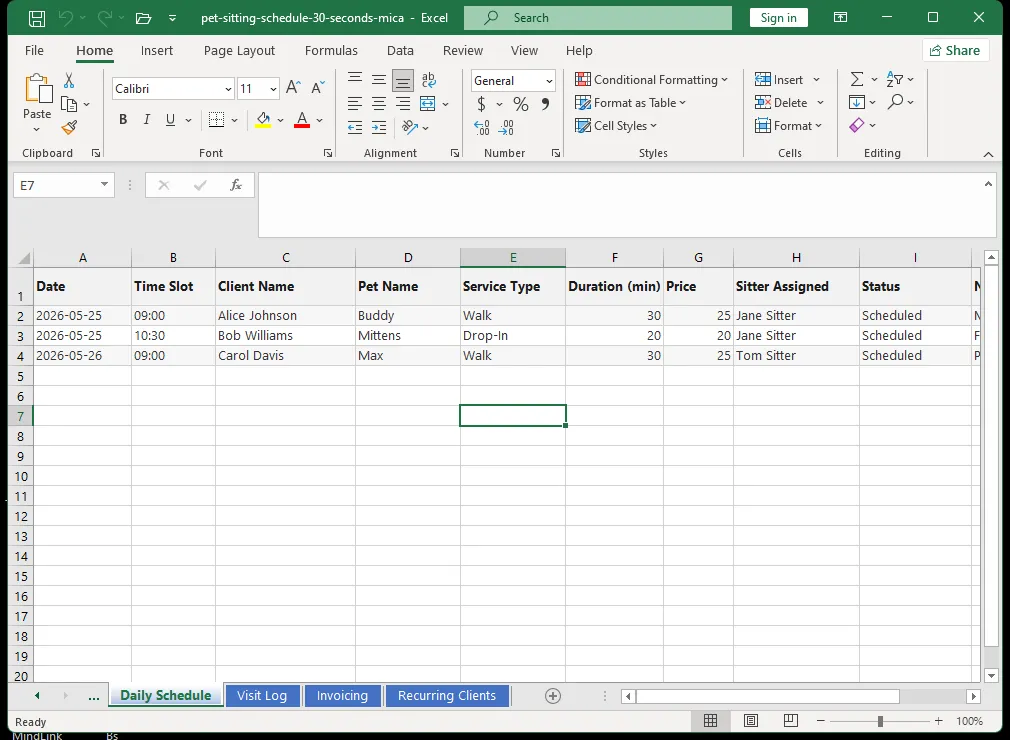
"Build a weekly schedule template with 7 days (Monday through Sunday) and time slots from 6 AM to 8 PM in 30-minute increments. Each appointment should show client name, pet name, service type (walk, visit, or overnight), duration in minutes, and price. Add conditional formatting to highlight overlapping appointments in bright red. Add a second view sorted by neighborhood."
This schedule becomes your daily command center. Here is how to use it effectively:
Entering Appointments
Each appointment goes into its time slot. Include the client name, the pet's name, and the type of service. If two appointments overlap, the cell turns red immediately. You will never accidentally double-book yourself again. For a sitter with 15 to 20 daily visits, this feature alone is worth the setup time.
Color Coding by Service Type
Assign a color to each service type: blue for standard walks, green for drop-in visits, purple for overnight stays. At a glance, you can see the shape of your day. A day with mostly blue blocks means steady walking income. A day with purple blocks means overnight revenue but less flexibility for additional walks.
Daily Revenue Calculation
The sheet calculates your daily revenue as you enter appointments. You can see at a glance whether you are on track for your weekly or monthly target. Most sitters charge between $20 and $50 per walk depending on location and duration. A full day of walks at $35 each adds up to $280 to $420. Knowing your daily number helps you make decisions about taking on new clients versus raising prices.
Step 3 — Build a Route Optimization Sheet
For dog walkers, driving time is untimed, unpaid overhead. Every minute spent driving between clients is a minute you cannot bill. When you manage 15 or more clients across a city or suburban area, inefficient routing can cost you 3 to 5 hours per week — time that could be spent walking additional clients or simply going home earlier.
Ask Mica:
"Create a route planning sheet that groups clients by neighborhood or zip code. Sort morning walks by geographic proximity. Add columns for travel time between appointments in minutes and distance in miles. Calculate total travel time per day and estimated fuel cost based on $0.65 per mile."
This sheet becomes your efficiency engine:
Grouping by Neighborhood
When you sort clients by zip code or neighborhood, you can schedule walks back-to-back within the same area rather than crisscrossing town. If you have three morning clients in the Brentwood neighborhood and two in Westlake, you can do all three Brentwood walks consecutively before driving to Westlake. This reduces travel time by 25 to 40 percent depending on your client distribution.
Tracking Mileage for Tax Purposes
The distance and travel time columns serve double duty. They help you optimize your route, but they also create a mileage log for tax deductions. The IRS standard mileage rate allows you to deduct $0.65 per mile driven for business purposes in 2025. A sitter driving 200 miles per week can deduct $130 per week, or approximately $6,760 per year. The route sheet automatically calculates this for you.
Real-World Impact
One Mica user in Portland, Oregon reported cutting 4 hours of driving per week after implementing route optimization. At her billing rate of $35 per walk and an average of two walks per hour of driving, that is $280 in additional potential revenue per week, or $14,560 per year. The optimization alone paid for her entire software setup — which cost nothing — thousands of times over.
Step 4 — Add Payment Tracking
You cannot run a business by remembering who paid you. Ask Mica:
"Add a payment tracking sheet with columns for client name, service date, service type, price, payment status (paid, unpaid, or partial), payment date, payment method (cash, card, Venmo, PayPal, or invoice), and invoice number. Show the total outstanding balance in bold at the top of the sheet. Conditional format any row that is unpaid for more than 7 days in red."
This sheet solves several problems:
Real-Time Outstanding Balance
The total at the top shows you exactly how much money clients owe you at any moment. This number is a powerful motivator. When you see that unpaid balance creeping upward, you know it is time to send reminders.
Payment Method Tracking
Knowing how each client pays helps you manage your cash flow. If most of your clients pay by Venmo but one pays by check that takes a week to clear, that is useful information. You can also see trends: if you are processing too many small payments through a platform that charges fees, you might encourage clients to switch to cash or direct transfer.
Monthly and Yearly Reporting
At the end of each month, you can sort by payment date and see exactly how much you earned. This makes tax filing straightforward. No more adding up Venmo transactions, bank deposits, and cash envelopes at the end of the year.
Sample Scenario
A sitter in Chicago processed 340 walks in January. Her payment sheet showed $11,900 in gross revenue, $1,020 in outstanding payments (8.5 percent of revenue), and $320 in platform fees across Venmo and PayPal. With this data, she decided to offer a 5 percent discount for clients who paid by cash or bank transfer, reducing her fee exposure by $180 per month.
Step 5 — Customize for Growth
The beauty of Mica is that you never outgrow the system. When your business changes, you change the spreadsheet with a sentence.
Adding a Referral Tracker
Ask Mica: "Add a referral tracking column to my client database. Show which clients have referred new business and how many referrals each has sent." This turns your best clients into a measurable growth channel.
Adding Seasonal Hold Management
Ask Mica: "Add a seasonal hold status column to my client records. When a client is on hold, exclude them from the active schedule but keep their information." This handles snowbird clients who travel for the winter.
Adding a Revenue by Client Report
Ask Mica: "Create a summary sheet showing total revenue by client for the current year, sorted highest to lowest." This shows you which clients represent your most valuable business relationships.
Adding Automated Invoice Generation
Ask Mica: "Create an invoice template that pulls client name, services, and pricing from the payment sheet and formats them as a printable invoice." This eliminates the need to manually type invoices for each client.
A Typical Day with the System
Here is what a normal day looks like for a sitter using the Mica system:
6:30 AM — Open the schedule on your phone (the Excel file lives in your cloud storage so it syncs across devices). Review the morning route order. Check the weather notes for any cancellations.
7:00 AM to 12:00 PM — Morning walks. Between walks, log any client notes in the schedule. "Fluffy seemed tired today." "Key is under the mat as discussed."
12:00 PM — Lunch break. Open the payment sheet. Check who needs an invoice reminder. Review tomorrow's schedule for any new bookings that came in overnight.
1:00 PM to 5:00 PM — Afternoon visits and walks. If a new booking request comes in, check availability on the schedule instantly. No need to say "I'll check my calendar and get back to you."
5:00 PM — End of day. Review completed visits. Log any issues. Close the sheet knowing tomorrow is under control.
The system replaces a notebook, three separate apps, and a significant amount of mental bandwidth. Everything is in one place. Everything is organized. Everything is local.
Open the pet sitting schedule template in Google Sheets →
Related Articles
Ready to let Mica handle your Excel chores?
Download for Free