
An audit trail is a chain with four links
A usable audit trail has four links: inputs back to source, changes at cell level, the reasoning behind a number, and a review sign-off. Excel supplies the first reliably and the second barely; the workbook has to carry the rest inside the file.
A usable audit trail answers four questions in order, and a break at any one link makes the rest unusable.
- Where did this number come from?
- What changed it since?
- Why was it set to that?
- Who accepted the result?
The order is not arbitrary. A trail that can answer question 1 but not 2 tells you the model was built from the right documents and tells you nothing about whether it is still that model. A trail that answers 2 and 3 but not 4 describes a draft, however well documented.
Excel gives you the first link almost for free and the fourth not at all, which is why most spreadsheet audit trails are half a chain, and why an AI-built workbook is worth assessing on all four rather than on whether it has comments.
Link 1: Inputs: every number back to a source file
The first link connects each input cell to the file or system the number came from.
In practice this means a model has an assumptions block: every number that came from outside the model sits in a named cell, with a note saying which document and which line it came from. Everything else is a formula. The test is simple: pick an output, trace its precedents back, and see whether the chain ends at a named assumption or at a typed number inside a formula.
Excel's Trace Precedents does the mechanical part: on the Formulas tab, it draws arrows from a cell to the cells it references, and clicking again walks one more level. The arrows show the direction of the link, and a red arrow marks a cell that contains an error. If the trail is right, tracing back from a forecast line ends in a handful of named cells and stops.
An AI-built workbook has a specific vulnerability here. A tool can produce a correct-looking number by typing it, and nothing in the cell distinguishes a typed 15,180 from a calculated one. That is why the assumption block matters more for an AI build than for a hand-built one: it is the only place where the difference between an input and an output is visible at a glance.
The source pack was two PDFs, not a filing, and some figures needed more than one OCR pass to read correctly. The 99 checks can prove the arithmetic that follows from those figures; they cannot tell you whether a 15,180 was read as 15,180 or 15,810. A second-pass figure is still an input the check sheet treats as given.
Link 2: Changes: which cell, when, and by what
The second link records every edit as a location, a time and an author, at cell level rather than as a summary.
This is the link Excel is weakest at. A workbook does not carry its own edit history. Version history in Microsoft 365 lives in the service the file is stored in, not in the file, and only if the file was saved there. A local .xlsx opened, edited and saved has no record of what moved. The old value is simply gone.
For an AI-built model that matters in a particular way: the tool may have made hundreds of edits, and the file you are reviewing is the final state of all of them. There is no undo history to inspect, and no diff against the version you looked at yesterday unless you kept one.
The practical substitutes are not equivalent but they are better than nothing:
- Save a numbered copy before every large change, so "what moved" can be answered by comparing two files.
- Use cell-level marking: a fill color or comment convention for cells that were edited after the first pass.
- Run a structure comparison rather than a value comparison, checking that formulas in a row still match after an edit.
This is the link where the claim that a tool leaves its audit trail inside the file either holds or does not. A trail that requires exporting a separate log, or opening a second system, is not the same artifact as the model and will drift from it. The workbook that carries its own record is the one a reviewer can open on a machine with no network.
Link 3: Reasoning: the assumption behind a number
The third link attaches the reasoning to the number it produced, not to a separate memo.
The distinction matters: a memo describing the model describes what its author believed at the time. A note on the cell describing why the assumption is 6.16% travels with the number when the number changes.
There are three levels of this, and most models reach the first one:
- A number, with a named cell. You know what it is and where it is used, but not why it has the value it does.
- A number with a derivation. The cell computes from another cell, so the reasoning is arithmetic.
- A number with its source and its limits. The cell says where the figure came from and what would make it wrong.
In a good build, the third level is concentrated in two places rather than spread through the sheet: the assumptions block, where each driver carries its derivation, and a limits sheet, where the things the model does not do are written out. The three-statement workbook behind this series does the second of those explicitly: eighteen numbered limits, three of which are material to the answer rather than housekeeping. The one that matters most is not a nuance: closing cash falls to negative, and nothing in the model funds the gap, because there is no revolver, no new debt and no dividend cut. A reviewer who reads only the checks would think the model is clean; the limits sheet is what stops that reading.
Link 4: Review: who accepted it, and when
The fourth link is a sign-off, and without it the first three describe an unreviewed draft.
Excel has no native review field, so this link lives in documents or in the filename: a review sheet with date, reviewer and scope, kept next to the model and not inside it. That is structurally weaker than the other three links, and it is why a model that will be relied on usually has a review memo rather than a reviewed workbook.
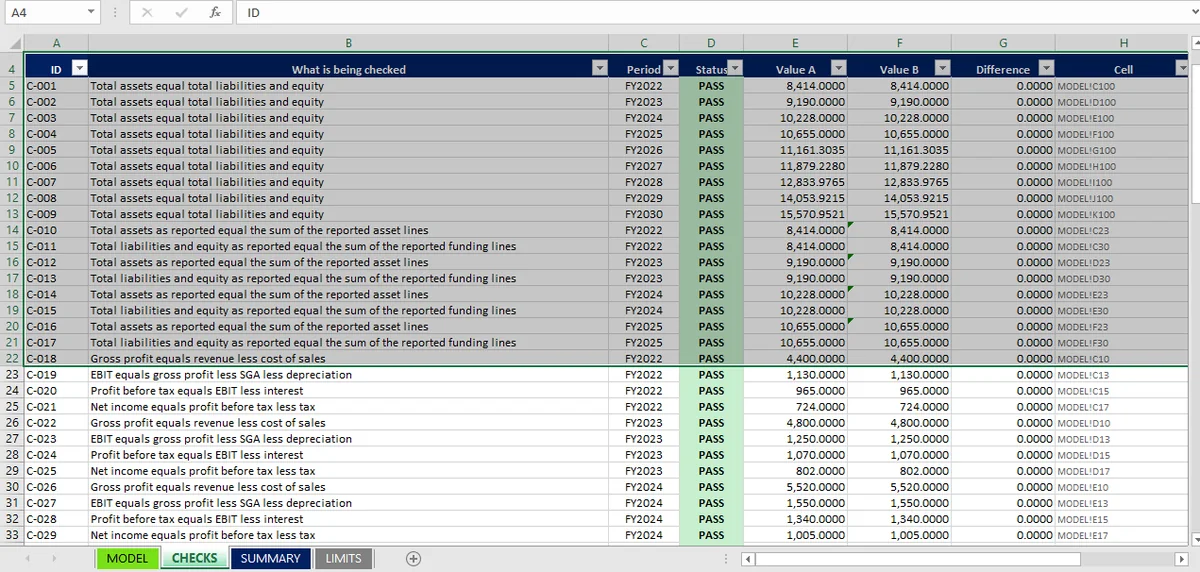
What can be put inside the file is a record of what was checked, which is not the same as who accepted it but is the part that survives staff turnover. The checks sheet does that job when the checks are live formulas rather than typed results: ninety-nine rows, each naming the model cell it tests, each returning PASS or FAIL from a difference and a tolerance. A reviewer's signature adds accountability; the checks add evidence. Both are wanted, and only one of them is reproducible six months later.
What an AI build changes about the trail
Four things, and they run in both directions.
More of the work is done, so more of the trail is invisible. A person building a model leaves a trail in their head and in the sequence of versions on their desktop. A tool that produces nine columns in one pass leaves neither. The final file is the only artifact, and it looks the same whether it was built by a careful process or by a lucky one.
The formulas are less idiosyncratic, which helps. A tool will usually write the same shape of formula across a row, because it generated the row as a unit. Hand-built models are where you find the tenth column that someone fixed on a Friday afternoon. In that narrow sense an AI build can be easier to review than a human one.
The reasoning is where it leaks. A person writing =C10*(1+growth) has a reason for the growth rate; a tool may have inferred it from four years of history, which is better, or supplied it from its own priors, which is worse, and the cell looks identical either way. This is the link where the difference between inference and invention has to be written down, and the policy-change article is the case where it matters most: a driver inferred from history is exactly what stops a model answering a policy question.
The review link becomes non-optional. When the author is a tool, no one can be asked what they meant. If the file does not carry its own reasoning and limits, the only remaining source is the person who prompted it, and their memory of the prompt is not an audit trail.
The practical consequence is that the first and third links carry more weight in an AI build than in a hand-built one, and the fourth carries all of it.
Testing the Audit Trail in Your Excel Workbook
The test is to pick a material output and walk it back to source without asking the tool that produced it.
Pick the closing cash figure in the last forecast year. Can you trace it to opening cash, to the cash-flow statement, to receivables and payables, to the days assumptions, to the source document? Every step should be a formula or a named input, and at the end there should be a document reference. If any step is a typed number, the trail ends there.
Then ask the four questions in order and note where the answer stops:
- Which file did this figure come from, and which line of it?
- What changed in this cell since the model was built?
- Why is the driver set at this value rather than another?
- Who reviewed the result, and what did they check?
Three clean answers and one blank is a normal, honest result. Four blanks is a spreadsheet. The difference between the two is what a reviewer is buying when they ask for an audit trail.
The audit trail stays inside the Excel file itself in a Mica build. No export, no separate log to reconcile. That is the standard to hold any tool to: if the evidence lives somewhere else, it is a description of the model rather than a property of it.
The checks that make the trail testable are described in the twelve ties, the build that produces them in the integration article, and the complete set of results in the three-statement hub. The method they belong to is set out in the Excel model audit. For the documented behavior of the Excel features the first link relies on, Microsoft's guide to tracing precedents and dependents covers the mechanics.