
Self-checking is a property of the build, not of the review
A self-checking model needs five build rules: one cell per driver, no typed numbers inside formulas, one formula shape per row, a checks sheet that reads the model, and a limits sheet. Together they make 99 assertions run every time the workbook recalculates.
Most models are checked after they are built, by someone reading formulas and comparing totals. A self-checking model is checked while it is built, because the checks are part of the workbook and run every time it recalculates.
The difference is structural. A check that lives in a review document describes what someone thought about the model on a particular day. A check that lives in a cell describes the model as it is now, including every change made since. That is why the ninety-nine checks in the workbook behind this series are formulas rather than findings, and why the summary sheet counts them with COUNTIF instead of stating the total.
Five build rules make that possible. None of them is clever, and all of them are easy to skip under time pressure. That is precisely why a model built by a tool tends to skip them.
The build rules that make checks possible
Rule 1: one cell per driver
Every assumption that moves the forecast gets its own named cell, and nothing else in the workbook contains that number.
In the three-statement build this is why 40%, 60, 75, 45, 6.59%, 10.49% and 6.16% appear once each rather than being typed into formulas. It also gives the model its sensitivity for free: move one cell and the entire forecast moves, with no editing.
The rule has a second purpose that is less obvious. A named driver is the only place where an input can be distinguished from an output. When a reviewer asks whether a number came from the accounts or from the model, the assumption block answers the question by construction.
Rule 2: no typed numbers inside formulas
This is the rule people break first, because a formula like =C10*1.4 is easier to write than =C10*(1+growth).
It matters because a typed number is invisible to every check that does not specifically look for it. A tie can still hold, a roll-forward can still roll, and the one cell that should have been linked is now a constant that will not move when the assumption changes. The workbook states the rule in the instruction itself ("don't hard-code any number that should be a formula"), and the checks sheet is what proves it was followed.
FORMULATEXT is the cheap test: it returns any cell's formula as a string, so a scan for numeric literals inside formulas finds the exceptions in a few seconds.
Rule 3: one period, one formula shape
Copy the formula across, never type it per column. A row where the last cell differs from the nine before it is a row someone edited, and the model cannot tell you whether the edit was a corrective assumption or a patch.
This is the rule that makes the consistency checks possible: comparing ten formulas in a row is only meaningful if nine of them were supposed to be identical.
Rule 4: a checks sheet that reads the model
The checks belong in the workbook, one row per assertion, with the model cell it tests named in a column.
The three-statement build has one row per check with an ID, a description, a period, a status, the two values being compared, the difference, and the cell being read: 99 rows, tolerance 0.01, status computed from the difference rather than typed. Because every row names its cell, any failing check points directly at the number that broke it, and any passing check can be verified by clicking through.
Rule 5: a limits sheet
The checks prove what holds. The limits sheet states what was never tested.
Eighteen entries in this workbook, three of them material: the funding gap, the missing FY2022 opening balance, and a single blended interest rate applied to both debt and cash. Without those entries, a reader would be entitled to assume the model covers the things it silently does not.
The second path, and what independent has to mean
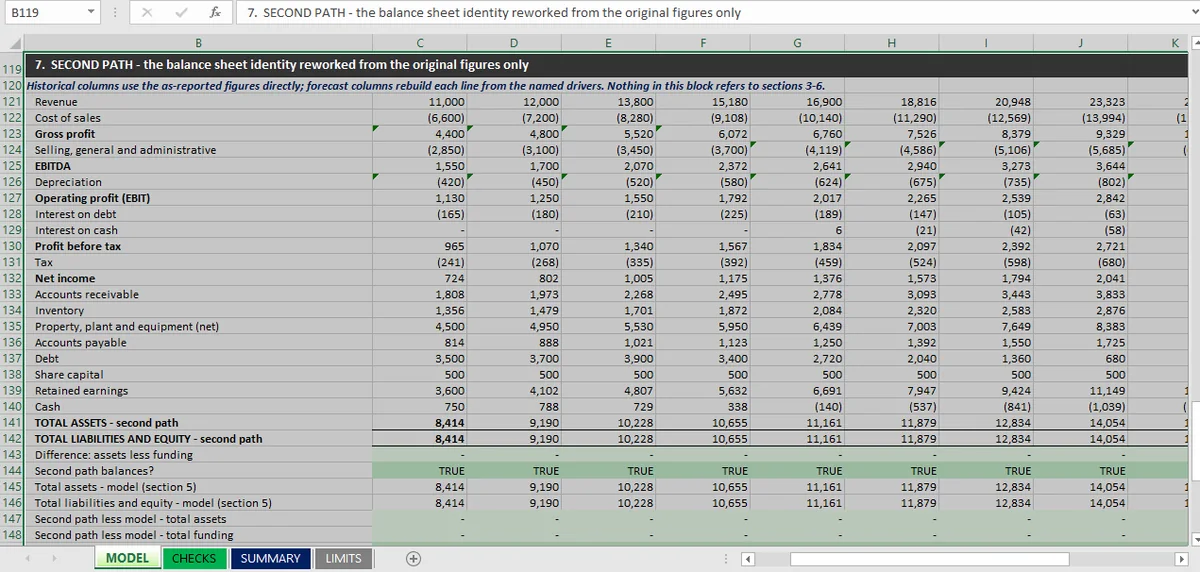
The strongest check in the workbook is not an assertion about the model. It is a second build of the same balance sheet, in separate columns, that the model is compared against.
Twenty-seven of the ninety-nine checks sit there. Nine test that the second path balances on its own; eighteen test that it agrees with the model line by line, in all nine years.
For that to mean anything, "independent" has to mean something specific: the second path may read the original reported figures and the named drivers, and nothing else. It may not read a schedule, a subtotal or an intermediate calculation from the model. If it reads the model's closing cash to check the model's closing cash, it is a tautology with extra columns.
The distinction is testable. Ask what a cell in the second path would do if the model's forecast block were deleted: if it still computes, the path is independent; if it errors or returns zero, it was never independent. Microsoft's trace precedents answers that question visually, one level at a time.
The limitation is structural too, and the workbook says so. Both paths were built from the same drivers by the same builder. The comparison is therefore conditional on the drivers: a shared driver error is outside what it can detect. That is why the second path is a check on the arithmetic and not on the assumptions.
How a Reviewer Should Read a Self-Checking Model
A self-checking workbook is read in three passes, and the build has to be arranged for that reading rather than for the author's convenience.
First, the headline: what the model says, in four or five numbers, on a sheet that is not the forecast. Revenue, net income, closing cash, and whether the checks pass. In the workbook here that is the top of SUMMARY, and it is where the finding lives, cash at −1,113, rather than buried in column K.
Second, the checks: how many, which families, what failed. A reviewer who trusts the checks does not need the model; a reviewer who does not will open CHECKS and pick a row.
Third, the limits: what the model does not do. This is the pass most readers skip and the one that changes how the first two are read. Ninety-nine passes and eighteen stated limits describe a model honestly. Ninety-nine passes and no limits sheet describes a claim.
Ordering matters because a reviewer forms a view in the first pass and spends the rest of the time confirming it. A file that puts the finding where the reader arrives first is a file that gets read correctly.
What the build costs
Three things, ranked by how much they hurt.
Time. The second path took as long as the model. It is a second build of the balance sheet for nine years, and it exists only to be compared against the first.
Sheet surface. Four sheets instead of one, with a checks sheet that is longer than most of the schedules it checks. A model whose evidence occupies more space than its forecast is unusual and correct.
Readability, for a specific kind of reader. Someone who wants to see the forecast can see it in MODEL. Someone who wants to know how it was verified has to read CHECKS, and that is a different skill from reading a forecast.
Against that, one thing is bought: the model can be re-checked in thirty seconds by anyone who opens the workbook, without trusting the person who built it. That is the entire proposition, and it is worth being blunt about the alternative. A model that cannot be re-checked is checked once, by whoever had the time.
When not to build this way
Not every model earns a second path. A one-page projection with five line items can be checked by reading it, and adding ninety-nine checks would be overhead with no reader.
The rule of thumb is the consequence of being wrong. If the model informs a decision that would otherwise be made with judgement, a tie sheet is enough. If it will be relied on by someone who did not build it (a lender, a board, an auditor, or a customer who bought it), then the second path and the limits sheet are the difference between a deliverable and a draft.
The build happens inside the open workbook in Mica, editing the .xlsx already open in Excel on Windows, so every formula it adds is visible in the sheet before you accept it. That visibility is what makes the build rules enforceable at all: a check you cannot see is a check you cannot verify, and a model you cannot verify is a model you have to trust.
The checks themselves are set out in the twelve ties, the evidence they leave for the next person in the audit trail, and the method that puts them in front of a reader in the Excel model audit. The complete results for this workbook sit in the three-statement hub.